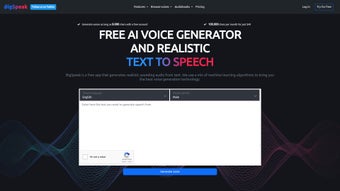

Download BigSpeak – Text‑to‑Voice, Voice‑to‑Text, AI Video & Voice Cloning Tool
Overview
BigSpeak is an all‑in‑one online platform that brings together the most demanding speech‑generation technologies under a single, easy‑to‑use interface. Whether you need to convert a novel into an audiobook, transcribe a meeting, create a synthetic voice for a brand, or generate AI‑driven video content, BigSpeak’s suite of tools covers every step of the workflow. Powered by state‑of‑the‑art machine‑learning models, the software supports more than 30 languages and a growing library of natural‑sounding voices, from calm narrators to energetic presenters.
Security is baked in: all data is encrypted in transit and stored in a compliant cloud environment, ensuring that sensitive scripts, recordings, and personal information remain private. The platform also includes a lightweight editing console that lets you fine‑tune pitch, speed, and emphasis, add background music, or splice multiple recordings into a seamless final product. Because it runs in the browser, there is no heavyweight client to install, and updates are applied instantly without user intervention.
This makes BigSpeak an ideal choice for creators, educators, marketers, and enterprises looking for a reliable, scalable, and cost‑effective way to harness synthetic speech and AI video capabilities.
Key Features of BigSpeak
- High‑Quality Text‑to‑Voice (TTV): Generates lifelike speech in dozens of languages using neural‑net models that capture subtle intonations and natural rhythm.
- Accurate Voice‑to‑Text (VTT) Transcription: Real‑time speech recognition with speaker diarization, punctuation insertion, and custom vocabulary support.
- Voice Cloning Engine: Upload a short sample (as little as 30 seconds) and create a unique synthetic voice that mimics the original speaker’s timbre.
- AI‑Powered Text‑to‑Video: Transform scripts into short video clips with automatically generated avatars, subtitles, and background scenes.
- Batch Processing & API Access: Automate large‑scale conversions via RESTful API, ideal for enterprises processing thousands of hours of audio.
- Secure Cloud Storage: End‑to‑end encryption, role‑based access control, and GDPR‑compliant data handling.
- Built‑in Editing Suite: Adjust speed, pitch, add pauses, insert background music, and export in MP3, WAV, or OGG formats.
- Cross‑Platform Accessibility: Fully web‑based, works on Windows, macOS, Linux, Android, and iOS browsers without additional plugins.
- Free Tier & Transparent Pricing: Generate up to 5,000 characters per month at no cost; paid plans start at $9.99/month for higher limits.
Installation, Setup, and Compatibility
One of BigSpeak’s biggest selling points is its zero‑install architecture. To get started, simply navigate to BigSpeak.com, create a free account, and you’re ready to upload text or audio files directly from your browser. The onboarding wizard walks new users through creating a project, selecting a voice, and choosing export settings. For power users, the platform offers an API key that can be generated from the dashboard; the key can be used in any HTTP client, enabling integration with custom pipelines, content management systems, or mobile apps.
Because the service runs in the cloud, it is compatible with all major operating systems: Windows 10/11, macOS Ventura and later, most Linux distributions (via Chrome, Firefox, or Edge), as well as Android 9+ and iOS 13+. The responsive design automatically adapts to different screen sizes, so you can edit a voice project on a desktop monitor and later fine‑tune it on a smartphone while on the go.
Installation is essentially non‑existent, but if you prefer a desktop shortcut, BigSpeak provides a progressive web app (PWA) manifest that lets you “install” the site as a native‑looking app on Windows, macOS, Android, or iOS. This creates an offline‑ready shell that syncs your work whenever an internet connection is re‑established. For corporate environments that require stricter firewall rules, BigSpeak supports dedicated IP whitelisting and SSO via SAML or OAuth, ensuring seamless integration with existing security policies.
Pros and Cons
Pros
- Exceptionally natural synthetic voices across many languages.
- Robust voice cloning that requires minimal sample data.
- Integrated text‑to‑video feature eliminates the need for separate video editors.
- Fully web‑based with a free tier, making it accessible to hobbyists.
- Strong security and compliance (GDPR, encryption at rest and in transit).
- API and batch processing for enterprise‑scale workloads.
- Cross‑platform support – works on Windows, macOS, Linux, Android, and iOS.
Cons
- High‑quality voice cloning is limited to paid plans; free users get only basic voices.
- Large video renders can be slower during peak cloud usage periods.
- Advanced editing (multi‑track mixing, detailed waveform editing) is less feature‑rich than dedicated DAWs.
- Internet connection required for any operation; offline use is limited to the PWA shell.
- Pricing for enterprise tier is not publicly disclosed, requiring a sales inquiry.
Frequently Asked Questions
Can I use BigSpeak for commercial audiobook production?
Yes. The commercial license included in paid plans permits unlimited distribution of generated audio, making BigSpeak a cost‑effective alternative to hiring professional narrators.
How secure is my data when I upload scripts or recordings?
All files are encrypted with TLS 1.3 during transfer and stored using AES‑256 encryption at rest. Access is controlled via role‑based permissions, and the platform complies with GDPR, CCPA, and ISO‑27001 standards.
Do I need any special hardware for voice cloning?
No. Voice cloning is performed entirely in the cloud. You only need a short, clear audio sample (30‑60 seconds) recorded on any device—smartphone, laptop, or professional microphone.
Is there a limit to how many characters I can convert per month on the free plan?
The free tier allows up to 5,000 characters of text‑to‑voice conversion each month and 2 hours of speech‑to‑text transcription. Upgrading to a paid plan removes these caps.
Can I integrate BigSpeak with my existing CMS or e‑learning platform?
Absolutely. The RESTful API provides endpoints for TTV, VTT, voice cloning, and video generation, allowing seamless integration with WordPress, Moodle, Canvas, or any custom system that can make HTTP requests.
Ready to transform your content with AI‑driven speech and video? Create your free BigSpeak account today and start generating high‑quality audio in minutes. For teams that need higher limits or custom SLAs, explore the paid plans or contact sales for a personalized quote.



.png)



